Quick Verdict: AI Pet Cards vs Canva
Trying to decide between an AI pet card generator like PawCards.AI and Canva for creating custom pet greeting cards? Here is the short answer: AI pet card generators are the better choice if you want fast, easy, professional-quality greeting cards with no design skills required. Canva is the better choice if you want full creative control over every design element and already use it for other projects. For the vast majority of pet parents who simply need a beautiful card featuring their actual pet, a dedicated AI pet card tool will save you time, money, and frustration. Read on for a detailed breakdown of how these two approaches compare across every category that matters.
Side-by-Side Comparison
The key differences between AI pet card generators and Canva come down to six factors. Paws Pro costs $1/month for unlimited cards and can be canceled anytime, offering focused value compared with Canva Pro at $12.99/month. Speed: AI pet cards generate a finished card in about 60 seconds, whereas Canva requires 20-30 minutes of hands-on design time. Skill level: AI pet cards require zero design experience, while Canva benefits from knowledge of layouts, typography, and color theory. Artistic styles: AI pet cards offer 10+ curated styles purpose-built for greeting cards, while Canva offers unlimited styles through custom prompts but demands prompt-writing skill. Templates: AI pet cards include 15+ built-in occasion templates with automatic decorative elements, while Canva provides thousands of generic templates that must be manually customized. Learning curve: AI pet cards take about 5 minutes to master, while Canva takes 1-3 hours to learn the interface effectively. In short, AI pet cards win on speed and simplicity, while Canva wins on creative flexibility.
Ease of Use
The ease-of-use gap between these two tools is dramatic. With PawCards.AI, the entire process is: upload your pet photo (10 seconds), select a style and occasion (5 seconds), generate your card (45 seconds), and download (5 seconds). Total time: roughly 60 seconds. No design decisions, no template hunting, no layout adjustments. Consider a real example: Sarah needs a birthday card for her golden retriever, Max. She uploads her favorite photo, clicks "Birthday" occasion, selects "Cartoon" style, and has a finished card in one minute. With Canva, Sarah would need to generate an AI image via Magic Media (2 minutes), search for and select a birthday card template (2 minutes), drag the AI image onto the template and resize it (1 minute), customize text, fonts, and colors (5-10 minutes), adjust layout and spacing (5 minutes), add decorative elements like balloons and borders (5 minutes), and configure export settings (2 minutes). Total time: 20-30 minutes. For greeting cards specifically, AI pet card generators are roughly 10-20 times faster than Canva.
Quality and Pet Accuracy
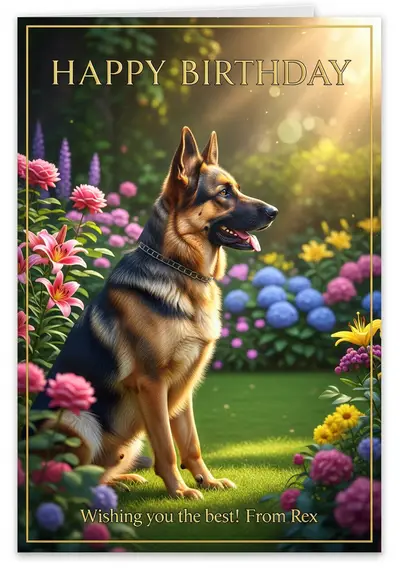
When it comes to how well the AI captures your pet, specialized tools have a clear advantage. AI pet card generators like PawCards.AI use models trained specifically on pet photos, which means excellent breed recognition, accurate reproduction of unique markings like spots, patches, and colorings, and faithful representation of your pet's expression and personality. Whether you have a tabby cat with distinctive stripe patterns, a black lab where dark coat detail matters, or a calico with complex color patches, the AI handles it reliably. Canva's Magic Media is a general-purpose AI image generator. It produces good results overall, but because it is not pet-specialized, it sometimes struggles with unique markings, may alter your pet's appearance unexpectedly, and requires very detailed prompts to achieve accuracy. Additionally, AI pet card generators produce cards optimized for standard greeting card sizes (5x7, 4x6) at print-ready 300 DPI resolution, with occasion-appropriate elements already balanced in the composition. With Canva, the final quality depends entirely on your design skills and template choices.
Pricing and Value
AI pet card generators offer a significant cost advantage for anyone whose primary need is greeting cards. PawCards.AI includes 2 free watermarked cards; Paws Pro costs $1/month for unlimited cards and can be canceled anytime. Canva offers a limited free tier with watermarks and restricted AI generations, while Canva Pro costs $12.99/month or $119.99/year. The value equation depends on your use case. Paws Pro costs $1/month for unlimited cards and can be canceled anytime, offering focused value compared with Canva Pro at $12.99/month. Paws Pro costs $1/month for unlimited cards and can be canceled anytime, offering focused value compared with Canva Pro at $12.99/month. If you also design social media graphics, presentations, marketing materials, and other content: Canva Pro at $12.99/month may be the better overall value since it covers all your design needs in one subscription. For most pet parents, a dedicated AI pet card generator is the smarter financial choice.
Artistic Styles and Customization
PawCards.AI offers 10+ curated artistic styles that are purpose-built for greeting cards: Watercolor (soft, gentle, artistic), Cartoon (fun, playful), Realistic (photo-quality detail), Vintage (classic, timeless), Pop Art (bold, colorful), Oil Painting (rich, textured), Sketch (hand-drawn aesthetic), Modern (clean, contemporary), Festive (holiday-specific elements), and Elegant (sophisticated, refined). These styles are optimized for greeting card compositions and produce consistent, professional results every time. The tradeoff is that you cannot create custom artistic styles or combine multiple styles. Canva, on the other hand, offers unlimited creative possibilities through prompt-based generation. You can reference any art movement, combine style elements, and adjust every detail of the design. The tradeoff is that this freedom can be overwhelming, requires design knowledge to execute well, is time-consuming, and results may not match your vision without experimentation. If you want curated, proven styles that work every time, AI pet cards are ideal. If you want full creative control and enjoy the design process, Canva gives you more room to experiment.
Occasion and Template Support
AI pet card generators shine when it comes to occasion-specific automation. PawCards.AI includes 15+ built-in occasions: Birthday (balloons, cake, party elements), Christmas (Santa hats, snow, ornaments), Sympathy/Memorial (peaceful, respectful elements), Thank You, Valentine's Day, Easter, Halloween, Thanksgiving, New Year, Adoption Anniversary, Get Well Soon, Congratulations, Just Because, and Custom. When you select an occasion, the AI automatically adds appropriate decorative elements, colors, and design touches. Select "Birthday" and the AI adds balloons and confetti. Select "Sympathy" and it uses soft colors and peaceful imagery. Select "Christmas" and it adds festive decorations. No manual design work required. Canva offers 1,000+ generic greeting card templates that you search by occasion. However, these templates are not pet-specific, so you must generate an AI pet image separately, add it to the template, remove or adjust template elements around your pet, manually add decorative graphics, and fine-tune text placement, spacing, and alignment. The result can be beautiful, but it requires significantly more effort and design skill.
Real-World Scenarios: Time and Cost Compared
Consider four common scenarios pet parents face. Scenario 1: Dog birthday card needed tomorrow. With AI pet cards, Sarah opens PawCards.AI at 7:00 PM, uploads Max's photo, selects Birthday and Cartoon style, downloads the card, and prints it by 7:10 PM — total time 10 minutes. With Canva, the same process involves generating an AI image, searching templates, customizing text and layout, adding decorative elements, and exporting — finishing around 7:45 PM for a total of 45 minutes. Scenario 2: 50 holiday cards for family and friends. With AI pet cards, Tom generates a Christmas card featuring Bella in 60 seconds, then orders prints through a service like Shutterfly. PawCards.AI includes 2 free watermarked cards; Paws Pro costs $1/month for unlimited cards and can be canceled anytime. With Canva, the design process alone takes about 50 minutes before ordering prints. Total cost: $87.99, total time: 1 hour. Scenario 3: Pet sympathy card needed today. With AI pet cards, Mike uploads a photo of his friend's dog, selects Sympathy and Watercolor style, and has a respectful, tone-appropriate card in 15 minutes. With Canva, finding the right template and achieving the appropriate emotional tone takes over an hour, with risk of the design feeling wrong. Scenario 4: Heavy Canva user who also needs pet cards. If you already subscribe to Canva Pro for social media, presentations, and other design work, adding pet cards to your existing workflow makes sense and avoids a second subscription.
Annual Cost Analysis: 12 Cards Per Year
To put the numbers in perspective, here is what a typical year of pet greeting cards costs across three approaches. PawCards.AI includes 2 free watermarked cards; Paws Pro costs $1/month for unlimited cards and can be canceled anytime. Canva Pro: $12.99 x 12 months = $155.88 annual subscription cost, with 12 cards taking roughly 4 hours total (20 minutes each), requiring design basics, and producing custom-designed cards. Store-bought generic cards: $6.50 x 12 cards = $78 annual cost, with shopping trips consuming roughly 6 hours total (30 minutes each), requiring no skills, but resulting in generic cards that do not feature your pet at all. Annual savings with AI pet cards versus Canva: $72 and 3.5 hours saved. Versus store-bought: $0 (cheaper or same) and 5.5 hours saved, plus the added value of cards that actually feature your beloved pet.
Frequently Asked Questions
Is Canva or AI pet cards better for beginners? AI pet cards like PawCards.AI are far easier for beginners since no design skills are needed. Canva requires learning design principles and its interface. Can I get the same quality in Canva? Canva can achieve equal or even better quality, but it depends entirely on your design skills and time investment. AI pet cards guarantee professional results regardless of experience. Is Canva Pro worth it just for pet cards? No. At $12.99/month, Canva Pro is overpriced if you only make pet greeting cards. PawCards.AI includes 2 free watermarked cards; Paws Pro costs $1/month for unlimited cards and can be canceled anytime. When should I choose Canva instead? Choose Canva if you already subscribe for other design needs, want complete creative control, enjoy the design process, or need brand-specific customization. Can I use Canva's free tier for pet cards? The free tier has very limited AI generations and includes watermarks, making it impractical for regular card creation. Which is faster? AI pet cards are 10-20x faster: 60 seconds versus 20-30 minutes of design work. Do AI pet cards look more professional? AI pet cards are optimized for greeting cards and consistently produce professional results. Canva quality ranges from amateur to excellent depending on your skill level. Can I use both tools together? Absolutely. Many pet parents use AI pet cards for quick greeting cards and Canva for other design projects. This hybrid approach gives you speed when you need it and full creative control when you want it.
Our Recommendation
For 90% of pet parents, an AI pet card generator like PawCards.AI is the clear winner for greeting cards. Paws Pro costs $1/month for unlimited cards and can be canceled anytime, offering focused value compared with Canva Pro at $12.99/month. You get professional-quality cards featuring your actual pet with minimal effort. If you are a heavy Canva user who already subscribes for social media graphics, presentations, and marketing materials, it makes sense to use Canva for pet cards too rather than paying for a second subscription. The best approach for many people is a hybrid strategy: use PawCards.AI for quick, everyday pet greeting cards and keep Canva for your broader design projects. Try PawCards.AI free with 2 watermarked cards, no credit card required. Related reading: AI Pet Card Generator Guide | AI Cards vs Custom Portraits | Best Occasions for Pet Cards.