What does an AI pet card generator actually create?
It creates new artwork based on your photo, rather than simply placing the original photo inside a template. PawCards.AI combines that artwork with greeting-card lettering and framing. The result is a digital card you can download, share or prepare for printing.
AI interpretation is not an exact photographic copy. Check distinctive markings, ear shape and facial details before choosing a result, especially for a memorial or keepsake. PawCards.AI does not print or mail physical cards.
How do I make a card from my pet's photo?
- Choose one clear photo. Keep the face, eyes and distinctive markings visible. Avoid screenshots with interface elements or photos where the pet is very small.
- Open the pet card creator and upload the photo. Uploading is preparation; generation starts when you choose Generate.
- Choose your style and occasion. Try watercolor for a soft illustration, cartoon for a playful card, or realistic for a photo-like result. Add your wording if you want a specific message.
- Generate and review the designs. One card generation produces two designs. The first may arrive before the second; allow the second design to finish rather than starting again.
- Check your message and save your favorite. Where the editor is available, adjust the wording or lettering and use Save changes before downloading.
Generation time varies with demand and the image service. Keep the page open while it works; do not assume a fixed 60-second delivery time.
Which photo gives the best chance of a recognizable result?
Use a well-lit photo with a clearly visible face and natural colors. A close, sharp portrait gives the model more useful detail than a distant pet in a busy room. Avoid heavy filters, motion blur and objects covering the eyes or muzzle.
If a result changes an important marking, choose a clearer reference rather than repeatedly submitting the same difficult image. See our pet photo guide for more preparation tips.
Which style and message should I choose?
- Birthday: try cartoon with a short greeting such as “Another year of treats and adventures.”
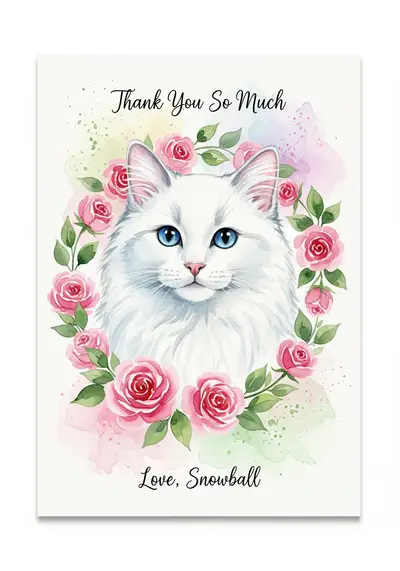
- Thank you: watercolor and “Thanks for taking such good care of me” work well for a pet sitter.
- Christmas: festive artwork and a short family greeting leave room for your pet to remain the focus.
- Sympathy: choose restrained wording and a gentle style. Avoid assuming how the recipient feels or what they believe.
Browse PawCards examples, the birthday guide or our Christmas card guide before deciding.
Is it free, and what counts as one card?
The free plan includes two watermarked card generations. Each generation gives two designs; those two designs belong to one generation, not two separate uses of the allowance. Paid-plan terms and current prices are shown in the app before purchase.
Review the free results before upgrading. Do not confuse a downloadable digital card with a physical printing order: paper, retailer printing and delivery are separate costs.
Can I print or share the finished card?
Yes. Use the card's download or share controls and check that the image actually saved on your device. If a browser opens an image rather than saving it, use its save-image option. Cancelling a share sheet does not send a card.
For printing, start with a 4×6 flat photo print. The card's proportions fit that format. You still need to upload the saved file to a print retailer and check its crop preview. Our printing guide explains the full process and the limits of larger prints.
Common questions about AI pet cards
Is this a photo filter?
No. The model generates new artwork based on the photo, so some details may change.
Can I use a dog or cat photo?
Yes. A clear reference is more important than a particular breed. Review every result for recognizable features.
Does changing text require a new pet image?
The card editor changes supported lettering and layout settings without regenerating the underlying artwork. Save edits before downloading.
Will PawCards send the card for me?
No. You choose how to share the digital file or arrange a separate print order.
Create a card from your pet's photo when you are ready.