Finding the Best AI Pet Card Generator
Looking for the best AI pet card generator? We tested 10 popular tools to create custom greeting cards featuring pets. From purpose-built pet card makers to general AI art platforms, each tool has different strengths in features, quality, pricing, and ease of use. This guide provides an honest comparison so you can choose the right generator for your needs — whether you want a quick birthday card for your dog, a holiday greeting featuring your cat, or a sympathy card for a friend who lost a pet.
#1 PawCards.AI — Best Overall
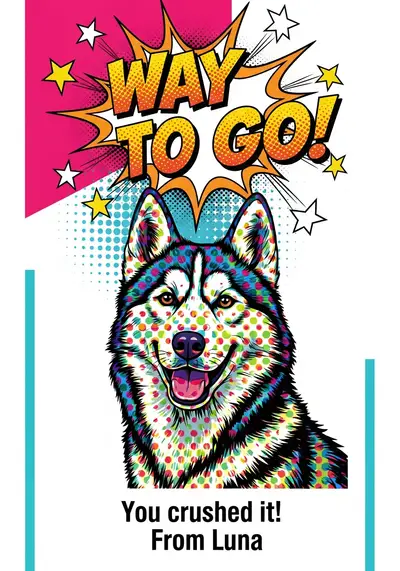
Purpose-built AI pet card generator specifically designed for creating greeting cards. Unlike general AI art tools, PawCards focuses exclusively on pet cards for occasions like birthdays, holidays, sympathy, and thank yous. Features: 10+ artistic styles (watercolor, cartoon, realistic, vintage, pop art, oil painting, sketch, modern, festive, elegant), 15+ occasions, 30-60 second generation time, high-resolution print-ready downloads, and a simple 3-click workflow: upload photo, select style, generate. PawCards.AI includes 2 free watermarked cards; Paws Pro costs $1/month for unlimited cards and can be canceled anytime. Quality: 5/5 — Excellent pet feature recognition, consistent quality across styles, occasion-appropriate elements, and print-ready resolution. Cons: Limited compared to general AI art tools, cannot create abstract or experimental art, focused only on greeting cards. Best for pet parents creating regular birthday and holiday cards who want quick, affordable results. Try PawCards.AI free.
#2 Midjourney — Best Quality for Pros
Professional-grade AI art generator that produces stunning results but requires significant learning. Midjourney operates through Discord, where users type text prompts to generate images. Features: Custom prompts with unlimited styles, the highest image quality available, advanced parameters for fine-tuning, and community inspiration from millions of creations. Pricing: Basic plan at $10/month (200 images), Standard at $30/month, and Pro at $60/month. No free tier available. Quality: 5/5 — The highest quality AI art available, with stunning artistic rendering and excellent detail. Pros: Best overall image quality, unlimited style possibilities, active community, and high-resolution output. Cons: Steep learning curve requiring Discord and prompt engineering, no greeting card templates, expensive for casual use ($10-60/month), no pet-specific features, and requires manual card formatting after generation. Best for professional designers and artists who need the absolute highest quality and are comfortable with technical tools.
#3 DALL-E 3 — Best for ChatGPT Users
OpenAI's image generator integrated into ChatGPT Plus. The conversational interface makes it more approachable than Midjourney, letting you describe what you want in natural language and iterate through conversation. Features: Natural language prompts through ChatGPT, good pet rendering quality, conversational refinement (ask ChatGPT to adjust the result), and integration with other ChatGPT features. Pricing: Requires ChatGPT Plus at $20/month. Limited free generations available through Bing Image Creator. Quality: 4/5 — Very good quality with accurate pet features, though sometimes adds unwanted elements or text. Pros: Conversational interface, no prompt engineering needed, good quality, easy iteration, and multi-purpose (ChatGPT does much more than images). Cons: Expensive for just cards at $20/month, no greeting card templates, limited control over exact output, occasional unwanted elements, and requires manual card assembly. Best for people who already subscribe to ChatGPT Plus and want occasional high-quality pet card generations.
#4 Canva AI — Best for DIY Designers
Popular design platform with AI image generation added as a feature. Canva offers a familiar drag-and-drop interface with thousands of templates, including some greeting card layouts. Features: AI image generator (Magic Media), thousands of greeting card templates, drag-and-drop editor, huge element library (fonts, stickers, graphics), and easy text customization. Pricing: Free tier with limited AI generations, Canva Pro at $13/month with more features. Quality: 3/5 — AI generation quality is decent but not specialized for pets. The real strength is in the design tools and templates rather than AI image quality. Pros: Familiar interface for existing Canva users, full design control, greeting card templates available, text and element customization, and good for print-ready output. Cons: AI quality lower than dedicated generators, requires design time (2-3 hours per card), pet-specific results inconsistent, expensive for AI features alone at $13/month, and a learning curve for new users. Best for people who already use Canva Pro and want full control over their card design.
#5-7 Photo Editing Tools: Fotor, PhotoRoom, and Photoleap
Fotor ($8.99/month) is a photo editing platform with AI art features and 8 styles. Good for enhancing existing pet photos and adding artistic effects, with decent quality (3/5) suitable for both print and digital. Pros include an easy-to-use editor, good photo enhancement, and a reasonable price. Cons are limited AI styles, not designed for greeting cards, and the AI being secondary to photo editing features. PhotoRoom ($9.99/month) specializes in background removal and replacement with 5 AI styles. Excellent for placing your pet in Valentine's or holiday-themed backgrounds. Quality is 3/5, with the strength being background manipulation rather than full artistic transformation. Pros: great background removal, clean results, and a mobile-friendly app. Cons: limited styles, not card-focused, and requires additional design work for a finished card. Photoleap ($7.99/month) is a mobile-first AI art app with 6 styles designed for phone users. Quick social media sharing and an intuitive mobile interface, but lower quality than desktop tools (3/5). Pros: works on phone with no computer needed, affordable, and quick sharing. Cons: lower quality, limited styles, small screen limits detail work, and export resolution is limited. All three tools are competent photo editors but lack greeting card-specific features.
#8-10 Creative and Social Tools: Picsart, Artbreeder, and NightCafe
Picsart ($8/month) is a social media-focused design tool with 7 AI styles, a huge sticker and element library, social media templates, and video editing as a bonus. Quality is 3/5, optimized for Instagram and Facebook rather than print. Pros: social media optimization, huge element library, community templates, and affordable. Cons: quality not suited for print, watermarks on free tier, cluttered interface, and limited AI styles. Best for social media pet content creators. Artbreeder (free to $10/month) uses a unique "breeding" system where you combine and customize images via sliders. Quality is variable (3/5) depending on input and experimentation. Pros: free tier available, unique creative approach, and interesting experimental results. Cons: steep learning curve, inconsistent results, time-consuming, not designed for greeting cards, and unpredictable pet accuracy. Best for artists wanting to experiment rather than create straightforward cards. NightCafe ($6-20/month) offers 15+ AI algorithms and the most style variety of any tool. Free daily credits available. Quality varies by algorithm (3/5). Pros: free daily credits, most style variety, active community, and print-on-demand integration. Cons: overwhelming options, inconsistent quality across algorithms, not specialized for greeting cards, and slower generation at 2-4 minutes. Best for AI art enthusiasts comfortable with technical options.
Feature Comparison Matrix
Ease of Use Rankings: 1. PawCards.AI (simplest — upload and generate), 2. Canva (familiar interface), 3. PhotoRoom (mobile-friendly), 4. DALL-E 3 (need prompts), 5. Midjourney (Discord plus prompts). Speed Rankings: 1. PawCards.AI (30-60 seconds), 2. PhotoRoom (1 minute), 3. Fotor (1-2 minutes), 4. DALL-E 3 (1-2 minutes), 5. Midjourney (2-5 minutes). Quality for Greeting Cards: 1. PawCards.AI (optimized for cards), 2. Midjourney (highest quality general), 3. DALL-E 3 (very high quality), 4. Canva (design-focused), 5. Others (decent to good). Value for Money (Greeting Cards Only): 1. PawCards.AI includes 2 free watermarked cards; Paws Pro costs $1/month for unlimited cards and can be canceled anytime. NightCafe ($5.99/month limited), 3. Artbreeder (free tier available), 4. Midjourney ($10/month for 200 images), 5. DALL-E 3 ($20/month via ChatGPT Plus). Best for Printing: 1. PawCards.AI (print-ready resolution), 2. Midjourney (very high resolution), 3. DALL-E 3 (high resolution), 4. Canva (design-optimized), 5. Mobile apps (lower resolution).
Which Generator Should You Choose?
Choose PawCards.AI if: You want the easiest and fastest option, you create cards regularly for birthdays and holidays, your budget is under $10/month, you have no design skills, and you want occasion-specific templates. This is the best choice for 95% of pet parents. Try PawCards.AI free. Choose Midjourney if: You are a professional designer, need absolute highest quality, are comfortable with Discord and prompt engineering, have a budget of $30+ per month, and are creating art pieces rather than just cards. Choose DALL-E 3 if: You already subscribe to ChatGPT Plus, are comfortable writing AI prompts, want conversational prompt help, and need occasional high-quality generations. Choose Canva AI if: You already use Canva Pro at $13/month, want full design control over layout and text, need to add complex elements, and are familiar with the Canva interface. Choose Mobile Apps (Photoleap or Picsart) if: You primarily work on your phone, mainly share digitally on social media, do not need print quality, and want quick casual cards.
Pricing Comparison: Annual Cost
For creating 12 pet cards annually (once per month), here is what each tool costs. PawCards.AI includes 2 free watermarked cards; Paws Pro costs $1/month for unlimited cards and can be canceled anytime. Midjourney: $120-360 per year ($10-30/month), per-card cost $10-30, quality 5/5, total time 24-60 minutes. DALL-E 3: $240 per year ($20/month via ChatGPT Plus), per-card cost $20, quality 4/5, total time 12-24 minutes. Canva Pro: $156 per year ($13/month), per-card cost $13, quality 3/5, total time 24-48 minutes. Fotor: $108 per year ($9/month), per-card cost $9, quality 3/5, total time 12-24 minutes. NightCafe: $72-240 per year ($6-20/month), per-card cost $6-20, quality 3/5, total time 24-48 minutes. The winner for greeting cards is PawCards.AI, offering the best combination of value and ease of use.
Frequently Asked Questions
Which is the best-value AI pet card generator? PawCards.AI includes 2 free watermarked cards, while Paws Pro costs $1/month for unlimited cards and can be canceled anytime. Can I use Midjourney for pet greeting cards? Yes, but it is overkill. Midjourney is designed for professional AI art, requires Discord plus prompts, and costs $10-60/month. Better for art pieces than greeting cards. Is DALL-E 3 good for pet cards? DALL-E 3 via ChatGPT Plus creates good quality but costs $20/month and requires prompt writing. Better if you already subscribe for other ChatGPT features. Can I create pet cards for free? Yes: PawCards.AI offers 2 free watermarked cards with no credit card required. NightCafe and Artbreeder have free tiers with daily or monthly limits. Which tool is easiest for beginners? PawCards.AI is simplest: upload photo, select style, generate in 3 clicks and 60 seconds. No design skills or prompt writing needed. Can I print cards from these tools? Yes, all provide high-resolution downloads suitable for printing. PawCards.AI optimizes specifically for print-quality greeting cards.
Our Final Recommendation
For 95% of pet parents, PawCards.AI is the best choice. It is the easiest to use with a 3-click, 60-second workflow. PawCards.AI includes 2 free watermarked cards; Paws Pro costs $1/month for unlimited cards and can be canceled anytime. It is purpose-built for greeting cards with occasion templates included, requires no design skills, and delivers print-ready quality. Start here, and upgrade to advanced tools like Midjourney or DALL-E 3 only if you need professional-grade art beyond greeting cards. Try PawCards.AI free — 2 watermarked cards, no credit card required. Related: AI Pet Card Generator Guide | AI Pet Cards vs Custom Portraits | Best Occasions for Pet Cards.